
Six colored shapes, a tap to turn them, and pictures that can always be finished.
Ages 4–6Shapes & spatialMath
The block builder
Copy the build, then build what the puppy’s camera sees from the other side
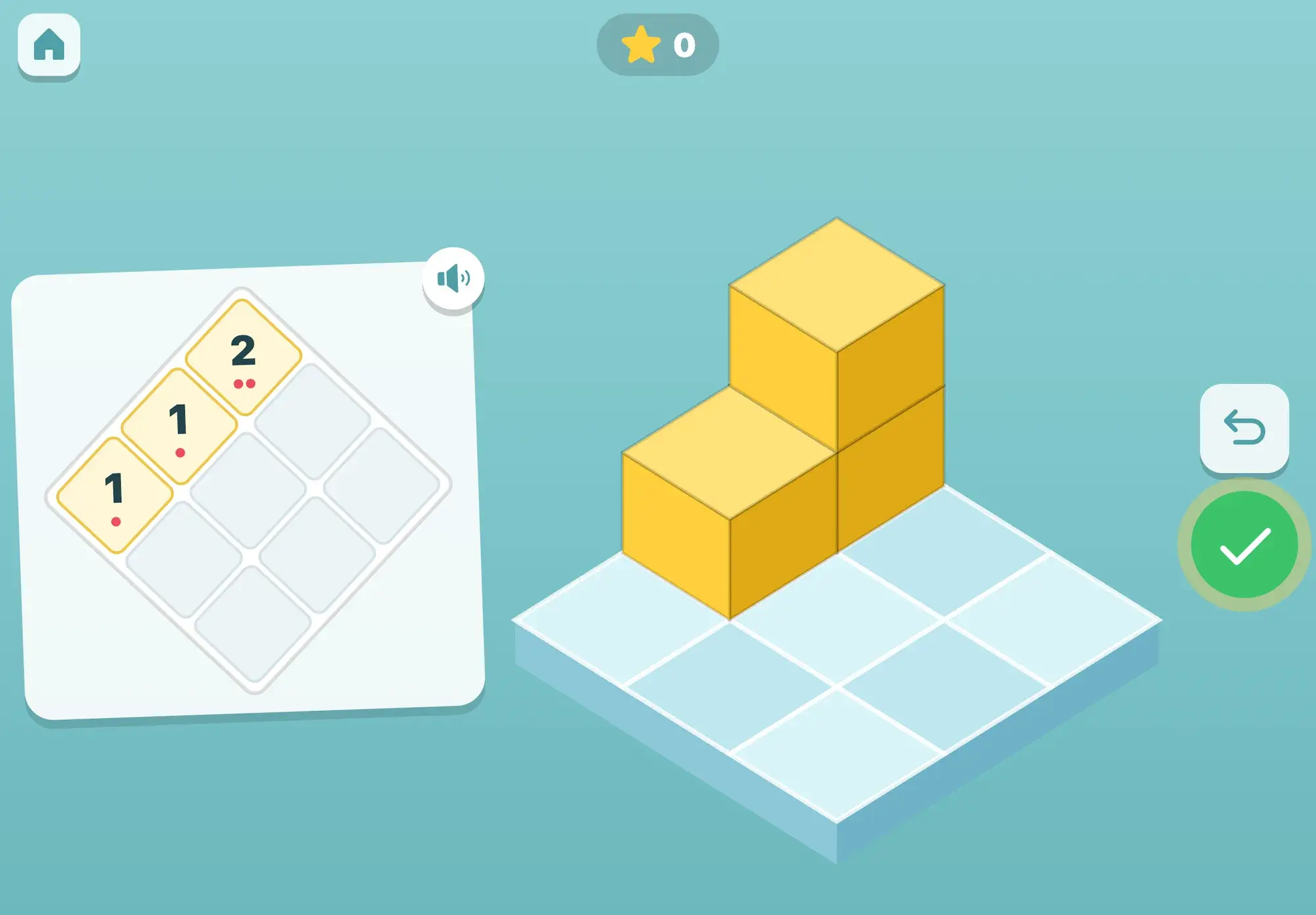
The block builder is a small plate of three by three squares and a card that shows what to build. Your child taps a square to put a block on it and taps a column to stack another block on top. The round undo button takes the last block off, and the big green tick checks the build.
It never says wrong. If the build isn’t the same yet, the help steps up with each check: first the columns that differ are outlined in yellow (“Almost! Look at this one.”), then faint dashed blocks show where blocks still go, and finally the whole answer appears in color on the plate. When it matches, there is a cheer, confetti and a star.
The first builds are plain copies. Later the card is a photo taken from another side of the plate, or a map seen from above, and in the end your child works out which picture a puppy with a camera would take from where it stands.
How it plays
The first builds are seen from the same side as your child’s plate: two to four blocks of one color, at most two high. Then a second color joins (tap a color first), with up to six blocks and towers up to three high. Two clean rounds open the next stage.
Now the card is a photo taken from another side, and the puppy with the camera stands at that corner of the plate. Two colors act as landmarks, and the build never looks the same when turned or mirrored, so there is only one right answer to find.
At first a big yellow arrow button turns the photo a quarter turn with each tap while the puppy walks round the plate: “Turn the picture until the puppy is standing next to you!” Then the photo turns while your child watches, then they get one peek, and at last they turn it in their head. The help steps down after each clean round and back up after a hard one.
The card shows the plate from above, turned to match, with the number of blocks for each square written as a number and as dots. Tapping a number says it out loud, so a child who doesn’t know every numeral yet can still read the map.
The other way round: here is a build. “The puppy takes a picture. Which picture shows what the puppy sees?” Your child’s own view is always one of the wrong answers, because that is the classic mix-up at this age. Other rounds ask which map shows the building.
Skills
The thinking
Spatial skill predicts later math and science and responds to training, with effects that last and transfer (Uttal et al. 2013). Puzzle and block play at 2 to 4 predicts spatial transformation skill (Levine et al. 2012), and copying block structures goes with early math skill (Verdine et al. 2014). Turning a build in your head and reading a map are the same skills, one step further.
Picturing a build turned round is mental rotation, which is only just emerging at 4 to 5. So at first your child does the turning on screen and sees it happen, which is how children later learn to do it in their heads, and the help fades as they succeed. Working out what someone else sees from another side is still developing at this age, which is why it comes last. Every picture is checked when a round is made, so no block is ever hidden behind a taller column.
Away from the screen
Ideas to carry the game into everyday life, no screen needed.
Build a small tower with real blocks and let your child copy it, then swap roles.
Build something, walk around it together and talk about what it looks like from the other side.
Draw a map of a build from above with a number on each square, and ask your child to build it.
Sit a teddy on the far side of a build and ask: “What can teddy see?”
Look at a tower for a moment, knock it down, and rebuild it from memory.
FAQ
It is the ability to picture shapes and spaces: how things fit together, how they look when turned, and how they look from somewhere else. It predicts later math and science, and it improves with practice.
It opens at every age and starts with plain copies: two to four blocks of one color, seen from the same side. Photos from another side come later, with a button that does the turning on screen at first.
It never says wrong. Each check gives a little more help, from a yellow outline to the full answer shown on the plate. A round that needed help simply doesn’t count as clean, and a hard round makes the next one easier.
Not for the game. But the same copying, turning and map games work on the floor with any set of cubes, and they are a good way to keep going after the screen is off.
More to explore
Six colored shapes, a tap to turn them, and pictures that can always be finished.
Join the dots, send the truck across, and see what happens
Spoken from the first tap, no reading needed, no ads, and progress that stays on your iPad.